How to Write a Resume That Passes Automated Screening Software in 2026
You spent hours perfecting your resume, only to hear nothing back.
Sound familiar?
You're not alone. Most companies now use automated screening software (also known as ATS) to filter resumes before a human ever sees them. I've watched qualified candidates get rejected not because they weren't qualified, but because their resumes never made it past the bots.
If your resume isn't formatted right or doesn't have the keywords the system is scanning for, it might never make it to the recruiter's desk. And that's frustrating because you can't fix what you don't understand.
I'm going to break down exactly how to write a resume that gets through automated filters in 2026 without sounding robotic or generic.
What Is Resume Screening Software (ATS) and How Does It Work?
ATS stands for Applicant Tracking Systems. These are tools like Workday, Greenhouse, iCIMS, Taleo, and dozens of others that companies use to manage job applications.
They're designed to filter, rank, and organize applications at scale. When a company gets 300 applications for one role, they can't manually review all of them. The ATS does the first pass.
Here's how it works: You submit your resume. The ATS scans it for formatting, keywords, job title matches, required skills, and sometimes even years of experience. It scores your resume based on how well it matches the job description. Then it ranks all the applications and surfaces the top ones to the recruiter.
If your resume scores too low, a human never sees it. That's the part that drives people crazy. You could be perfect for the role, but if the ATS doesn't recognize that, you're out.
I had a client who applied to 40 jobs with the same resume and got zero responses. We reformatted it to be ATS-friendly, and she got three callbacks in the first week. Same experience. Same qualifications. Different format.

Why Most Resumes Get Rejected by ATS
Using images, tables, or fancy design elements is the biggest killer. ATS systems can't read images. They struggle with tables. If your resume has a fancy header with your name in a graphic or your contact info in a table, the ATS might skip it entirely.
I've seen beautiful resumes that were completely unreadable to ATS. The candidate thought they were standing out. They were, just not in the way they wanted.
Saving your resume in the wrong file format causes problems, too. Some ATS systems struggle with PDFs. Others can't read .pages files or Google Docs links. If you're not submitting a .docx or a simple PDF, you might be setting yourself up for failure.
Leaving out essential keywords from the job posting is the other big issue. If the job description says "project management" and your resume says "managed projects," the ATS might not connect the dots. It's looking for exact or close matches.
Inconsistent or outdated section headers confuse the system. If you label your work history "Professional Journey" instead of "Experience" or "Work History," the ATS might not know where to look for your job titles and dates.
One job seeker told me he'd been using a resume template he found on Canva. It looked great. But it had columns, icons, and a sidebar. His resume was getting rejected by every ATS. We rebuilt it in a simple format, and he went from zero responses to five interviews in three weeks.
The Best Resume Format for Beating Bots
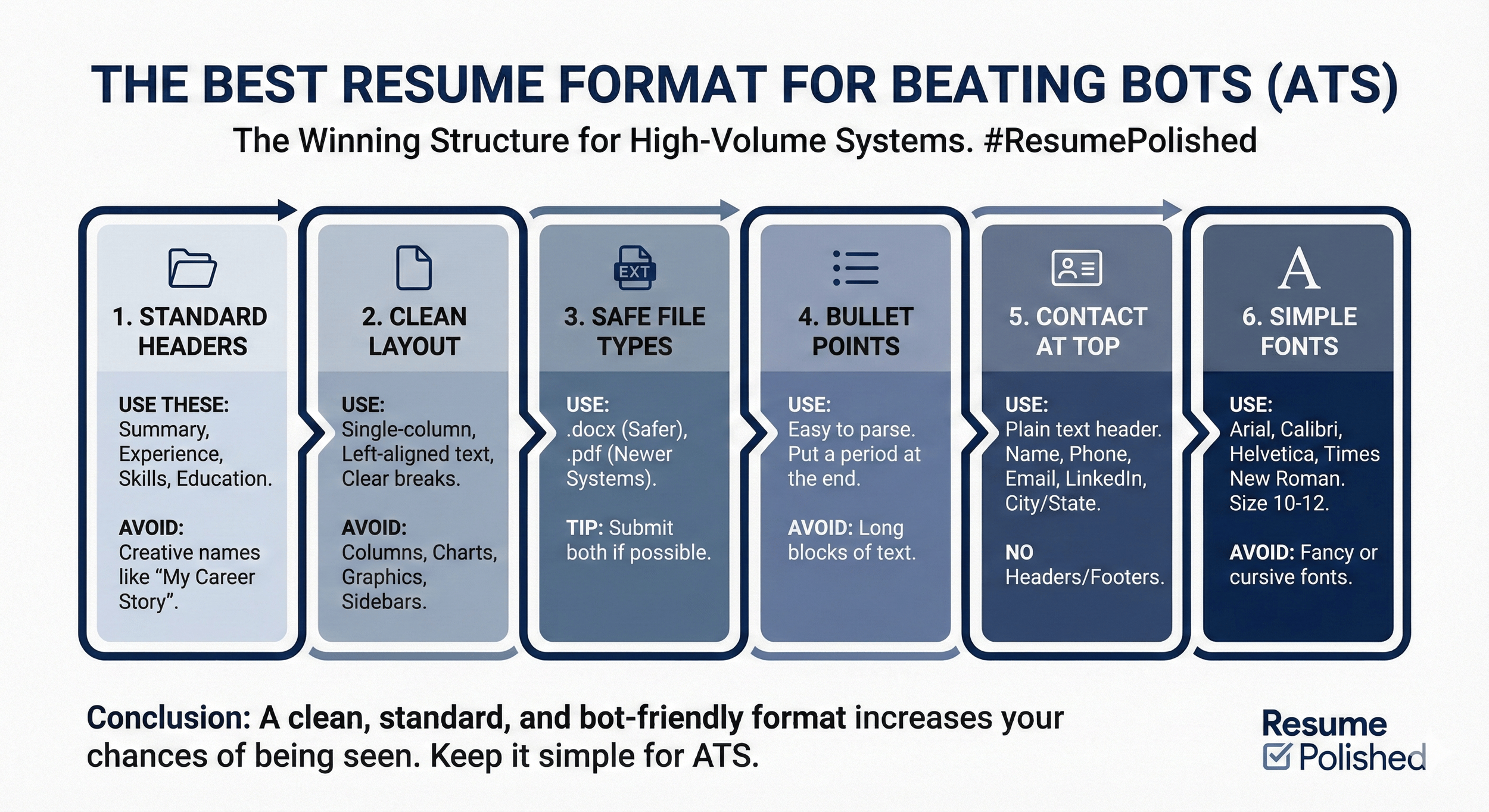
Use standard section headers that ATS systems recognize. Stick with: Summary (or Professional Summary), Experience (or Work Experience), Skills, and Education. Don't get creative with names like "My Career Story" or "What I Bring to the Table."
Avoid columns, charts, and graphics. Single-column layouts work best. Left-aligned text. Clear section breaks. No sidebars with skills or contact info tucked into the margins.
Stick to .docx or .pdf, depending on the platform. If the job posting doesn't specify, .docx is usually safer. Some older ATS systems still struggle with PDFs, even though newer ones handle them fine. When in doubt, submit both if the system allows multiple files.
Use bullet points, not paragraphs. Bullet points are easier for ATS to parse and easier for humans to scan. Long blocks of text get skipped by both. Be sure to put a period at the end of your bullet point on resumes because some ATS systems will group all of the bullet points together into one big block of text (and you don’t want your resume to look like a giant run-on sentence on the back end).
Your contact information should be at the top of the page in plain text. Name, phone number, email, LinkedIn URL, city, and state. No headers or footers. Some ATS systems don't read those sections.
Keep your fonts simple. Arial, Calibri, Helvetica, Times New Roman. Size 10 to 12 points. Nothing fancy. Nothing cursive. Nothing that's hard to read.
If you need a clean, ATS-friendly template to start with, our professional resume writing services include formatting that passes both ATS systems and recruiter reviews.
How to Use Keywords Strategically
Match the Job Description Without Keyword Stuffing
Pull language directly from job postings. If the job description says "stakeholder management," use "stakeholder management" on your resume. If it says "financial modeling," use "financial modeling."
Focus on job titles, skills, tools, certifications, and soft skills. These are what ATS systems scan for. If the posting asks for "Salesforce," make sure "Salesforce" appears on your resume if you have that experience.
Use the exact wording when possible. "Project management" is not the same as "managing projects" in an ATS. The system is looking for specific phrases. Give it what it wants.
Sprinkle keywords naturally throughout your experience and summary. Don't just dump them in a skills section and call it done. The ATS scores higher when it sees keywords in context, showing you've actually used them.
Here's an example. The job posting says: "Looking for a marketing manager with experience in SEO, content strategy, and team leadership."
Your resume should include those exact phrases:
"Led content strategy for B2B blog, increasing organic traffic by 45% through SEO optimization and keyword targeting."
"Managed team of four content creators, providing strategic direction and performance feedback."
See how the keywords are woven into actual accomplishments? That's what works. Not just listing "SEO, content strategy, team leadership" in a skills section with no context.
Don't Overdo It
I've seen resumes where people stuffed keywords into every sentence. It reads terribly. And recruiters can tell. The ATS might let it through, but the human reading it will toss it.
Your resume still needs to sound like a human wrote it. Use keywords strategically, not desperately.
Tools That Help You Test Your Resume
Free resume scanners like Jobscan, ResumeWorded, or Teal can help you identify gaps. You upload your resume and paste in a job description, and they show you which keywords you're missing and where your formatting might cause issues.
These tools aren't perfect, but they're useful. I use them with clients as a first pass to see what we're missing before we refine the language.
How to upload a resume and compare it to a job description is simple. Copy the job posting. Paste it into the scanner. Upload your resume. The tool will give you a match score and suggestions.
Don't over-optimize based on what the scanner says. If it tells you to use "blockchain" 15 times and you've only worked on blockchain once, don't force it. The goal is to match genuinely, not to trick the system.
Make sure a human still enjoys reading it. The ATS gets you through the door. The recruiter decides if you get an interview. If your resume is stuffed with keywords but doesn't tell a clear story, you'll pass the ATS and fail the human review.
One client came to me after using a resume scanner and rewriting his entire resume to hit 95% keyword match. It passed the ATS but sounded like garbage. We scaled it back to 80% match with natural language, and he started getting interviews.
If you want expert eyes on your resume instead of just relying on software, book a resume review session to give you feedback from someone who understands both ATS systems and what recruiters actually want to see.
Additional Tips to Improve ATS Compatibility
The Small Details That Matter
List both acronyms and full spellings when relevant. For example, "SEO (Search Engine Optimization)" or "CRM (Customer Relationship Management)." Some ATS systems search for the acronym. Some search for the full phrase. Cover both.
Customize each resume for the job you're applying to. I know it's tedious. But a one-size-fits-all resume doesn't work anymore. You need to adjust your keywords and emphasis for each role.
That doesn't mean rewriting from scratch every time. It means tweaking your summary, adjusting a few bullet points, and making sure the most relevant experience is prominent.
Use plain fonts in the 10 to 12 point range. Nothing smaller or you'll be hard to read. Nothing bigger or you'll look amateurish.
Label your file professionally. Don't submit "resume_final_FINAL_v3.docx." Use "FirstName_LastName_Resume.docx." It's cleaner, it's professional, and it makes it easier for recruiters to find your file later.
Spell out months and years in your dates consistently. "January 2020 – March 2023" or "01/2020 – 03/2023." Pick one format and stick with it throughout the entire resume.
Avoid headers and footers for critical information. Some ATS systems skip those sections entirely. Keep your name, contact info, and all content in the main body of the document.
FAQs: How to Write a Resume That Passes Automated Screening Software
-
Use a .docx file unless the job post specifically asks for PDF. Some older ATS systems struggle to parse PDFs correctly, which can break your formatting or skip content entirely. When in doubt, .docx is the safer choice.
-
Resume scanners like Jobscan can help identify missing keywords, but don't rely on them 100%. Use them as a guide, then rewrite with natural language. Remember, a human still reads your resume after the ATS does. You need to pass both filters.
-
Copy and paste three to five job descriptions for similar roles into a word cloud or keyword analyzer. Pay attention to repeated phrases, tools, and responsibilities. Prioritize those in your resume, and use the exact wording whenever possible.

About Career Coach and Author
Hi, I’m Elizabeth Harders. I’m a former recruiter turned career strategist who has spent years on the other side of the hiring table. I’ve seen thousands of resumes and cover letters, some great, most forgettable. Now, I help professionals craft applications that actually stand out and lead to interviews.
My specialty? Helping ambitious professionals land six-figure roles at Fortune 500 companies. Whether it’s fine-tuning a resume, optimizing a LinkedIn profile, practicing for an interview, or crafting a powerful cover letter, I make sure my clients present themselves as the best possible candidate for the job they want.
If you’re tired of sending applications into the void, book a free career strategy session.
Get Through the Bots Without Losing Your Voice
You don't need to game the system. You just need a resume that speaks both to the software and the recruiter reading it.
I've seen too many people get frustrated because they think ATS is some impossible barrier. It's not. It's just a filter that rewards clear formatting and relevant keywords. Once you understand how it works, you can build a resume that passes without sounding like a robot wrote it.
By using the right structure, smart keywords, and clean formatting, you make sure your application actually gets seen. Then your experience and accomplishments can do the talking.
If you're still getting rejected and you're not sure why, the problem might not be your qualifications. It might be your resume format. Our corporate resume writing services include ATS optimization so your resume passes the bots and impresses the recruiters.
Stop letting automated systems keep you from opportunities you're qualified for. Build a resume that works with the technology, not against it.